Apple Watch Gym Tracking: What It Gets Right (and Misses) for Lifters
Apple Watch excels at cardio tracking but falls short for weightlifting. Missing: set-by-set logging, RPE tracking, and exercise-specific metrics lifters need for progression.
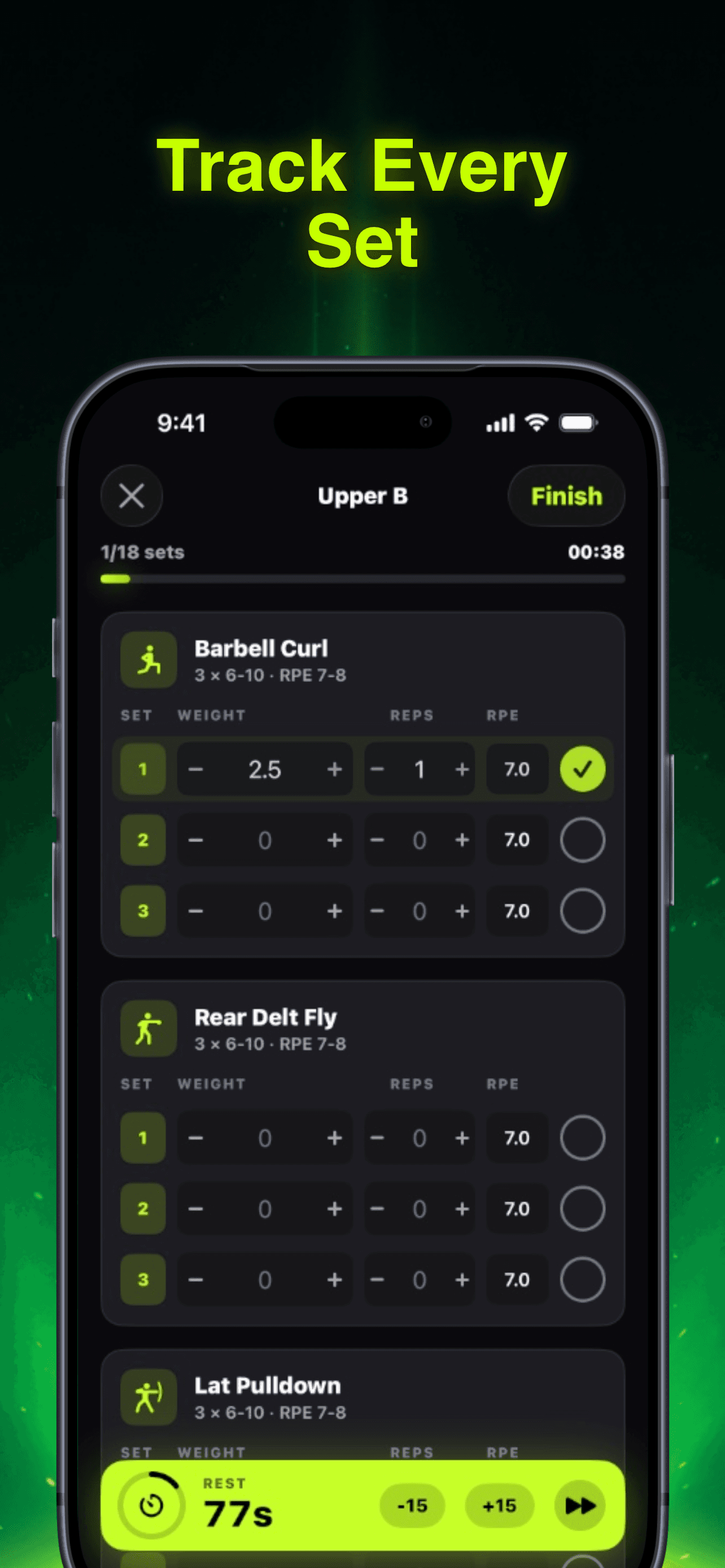
Photo by RepBro.
Your Apple Watch buzzes. Heart rate spiked. Calories burned: 247. Active minutes: 42. The summary looks impressive, but as a lifter, you know something's missing. Where are your sets? Your working weights? The RPE data that actually drives progression?
Apple Watch gym workout tracking excels at cardio metrics but lacks the granular data weightlifters need. While it captures heart rate and estimates calories with reasonable accuracy, it can't log sets, reps, weights, or rate of perceived exertion—the metrics that determine whether you're actually getting stronger.
This gap matters more than most lifters realize. Your training data shapes your next workout. Miss the details, and you're programming blind.
What Apple Watch Gets Right
The Watch dominates three areas that matter for gym-goers.
Heart rate accuracy rivals chest straps. Multiple studies show the Series 4 and later models track heart rate within 5% of medical-grade monitors during steady-state exercise. For cardio sessions, HIIT circuits, or tracking recovery between sets, this precision helps.
Automatic workout detection works. Start moving weights around, and the Watch notices within 3-5 minutes. It switches to "Strength Training" mode and begins logging. No fumbling with buttons mid-set.
Calorie estimates improve over time. The Watch learns your baseline metabolic rate, adjusts for your movement patterns, and factors in heart rate variability. After 2-3 weeks of consistent wear, calorie burns become reasonably accurate for most users.
The integration with iPhone Health app creates a unified fitness picture. Sleep data, nutrition logs, and workout summaries sync automatically. For general fitness tracking, it's seamless.
Where Apple Watch Falls Short for Strength Training
But lifters need more than heart rate and calories. We need data that drives decisions.
No Set-by-Set Logging
Apple Watch records "Strength Training" as a single block. It knows you lifted for 47 minutes and burned 180 calories. It doesn't know you deadlifted 315 for 5 sets of 3, or that your third set felt like RPE 8.5.
This matters because progression depends on specifics. Did you add 10 pounds to your bench? Hit a rep PR on squats? The Watch can't tell you. It treats a max effort single the same as a 20-rep burnout set.
Missing Exercise Recognition
Unlike some dedicated fitness trackers, Apple Watch doesn't identify specific exercises. It knows you're doing "strength training," but it can't distinguish between a deadlift and a bicep curl. This makes it impossible to track exercise-specific progress or identify weak points in your program.
No RPE or Effort Tracking
Rate of Perceived Exertion drives autoregulation. A set that feels like RPE 6 suggests you can add weight next week. RPE 9 means you're pushing limits and might need a deload. Apple Watch captures none of this subjective data that experienced lifters rely on.
Limited Rest Timer Functionality
The Watch includes a basic timer, but it's not integrated with workout tracking. You can't automatically log rest periods between sets or analyze how rest time affects performance. Dedicated lifting apps offer sophisticated rest management that adapts based on exercise type and training phase.
How Apple Watch Weightlifting Data Syncs
Despite these limitations, Apple Watch can integrate with specialized lifting apps through HealthKit.
Third-party apps can read Apple Watch data. Heart rate, calories, and workout duration sync automatically. Some apps use this data to estimate training stress or validate manually logged sessions.
Manual entry still required. You'll need to log sets, reps, and weights separately in your lifting app. The Watch provides the cardio overlay—heart rate spikes, recovery patterns, overall session intensity.
Workout summaries export easily. Most lifting apps can push completed workouts back to Apple Health, creating a complete training log that includes both Watch metrics and manual strength data.
This hybrid approach works for many lifters. Use the Watch for what it does well—heart rate, calories, workout detection—and rely on specialized apps for the details that matter.
Better Alternatives for Serious Lifters
If you prioritize strength progress over general fitness metrics, dedicated lifting apps offer more useful data.
Comprehensive logging beats heart rate tracking. Apps that capture sets, reps, weights, and RPE provide actionable feedback. You can identify plateaus, plan deloads, and track long-term progress patterns that the Watch misses entirely.
Exercise-specific analytics matter. Knowing your bench press is stalling while your squat improves helps you adjust programming. Apple Watch treats all lifting the same.
Autoregulation requires subjective data. RPE, fatigue levels, and form quality influence your next workout more than calories burned. The best lifting apps capture this context.
The ideal setup combines both: Apple Watch for health metrics and workout detection, plus a specialized app for the lifting data that drives progress. Your Watch tracks the forest. Your lifting app maps the trees.
Making Apple Watch Work for Your Lifting
If you're committed to the Apple ecosystem, you can maximize what the Watch offers.
Use it for cardio and conditioning. Heart rate zones, calorie tracking, and workout detection shine during metabolic circuits, rowing sessions, or bike intervals.
Leverage automatic workout detection. Let the Watch handle start/stop timing while you focus on lifting. Review session duration and intensity afterward.
Pair it with a dedicated lifting app. Log your strength work manually in an app designed for lifters. Let the Watch handle the background health metrics.
Track recovery patterns. Heart rate variability, resting heart rate trends, and sleep data from the Watch can inform your training decisions even if it doesn't log your deadlift PR.
The Watch becomes a valuable training tool when you understand its strengths and work around its limitations.
The Bottom Line
Apple Watch excels at what it was designed for: comprehensive health tracking with a focus on cardio exercise. For runners, cyclists, and general fitness enthusiasts, it's nearly perfect.
For serious lifters, it's a solid health tracker that misses the details that matter most. You'll need additional tools to capture the set-by-set data that drives strength progress.
The solution isn't abandoning your Watch—it's pairing it with an app built specifically for lifting. Get the best of both worlds: seamless health integration from Apple and detailed strength tracking from specialists.
Your next workout should include both heart rate data and RPE logging. The Watch handles the first. You need something else for the second.
Frequently asked questions
- Can Apple Watch track individual sets and reps during weightlifting?
- No, Apple Watch only records strength training as a single workout block with duration, calories, and heart rate. It cannot log individual sets, reps, weights, or RPE data that lifters need for progression tracking.
- How accurate is Apple Watch heart rate monitoring during weightlifting?
- Apple Watch Series 4 and later models track heart rate within 5% accuracy of medical-grade monitors during most exercises. However, rapid grip changes and wrist movement during heavy lifting can occasionally cause brief reading errors.
- Can Apple Watch data sync with dedicated weightlifting apps?
- Yes, through HealthKit integration. Lifting apps can read Apple Watch heart rate, calories, and workout duration data, but you still need to manually log sets, reps, and weights in the specialized app.
- Does Apple Watch automatically detect different weightlifting exercises?
- No, Apple Watch only detects general 'Strength Training' activity. It cannot distinguish between specific exercises like deadlifts, bench press, or squats, limiting its usefulness for exercise-specific progress tracking.
- What's the best way to use Apple Watch for strength training?
- Use Apple Watch for heart rate monitoring, workout duration, and calorie tracking, while pairing it with a dedicated lifting app that captures sets, reps, weights, and RPE for comprehensive strength training data.